
 With prior versions of WordPress (2.3.3 and earlier) ContentRobot often installed plugins to assist with advanced WYSIWYG post tools and better image management. We knew that 2.5 had included a newer version of TinyMCE and also integrated the ability to include media (pictures, songs, video, and other file types) into the Write > Post panel.
We were looking forward to seeing if there was a big leap in functionality. We like the new Media Manager because it's quicker and tidier to add images when blogging.
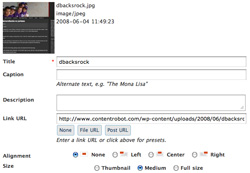
To add images, click on the add image button, then:
- Enter a title, add a caption, and longer description
- Choose to upload an image, use an image from the gallery (images in the current article) or images from the media library (previously uploaded in any post or page).
- Set your alignment (left, center, right)
- Link the image (none, file URL, post URL)
- Click the Insert into Post button
Note: You can set up various image parameters in the the Options > Miscellaneous panel) to indicate your thumbnail and medium sizes, as well as the ability to store the media in month/year folders. There is also a new Media Library section, where you can view, edit, and delete media files.
While it's not perfect - you don't really embed a podcast or a video, rather it makes them links - it makes it much nicer to add different media types to posts and pages.
What do you think of the new Media Manager?